Sales Order Listing:
This report can is available both in Sales and in Purchase module.
Option 1 through Sales Module:
Click on Sales, then click on Reports and then click on Sales Order Listing.

Option 2 through Purchase Module:
Click on Purchase, then click on Reports and then click on SO/PO Listing.

Following page will open as shown in the screenshot below and by default PO is selected in Report Type.
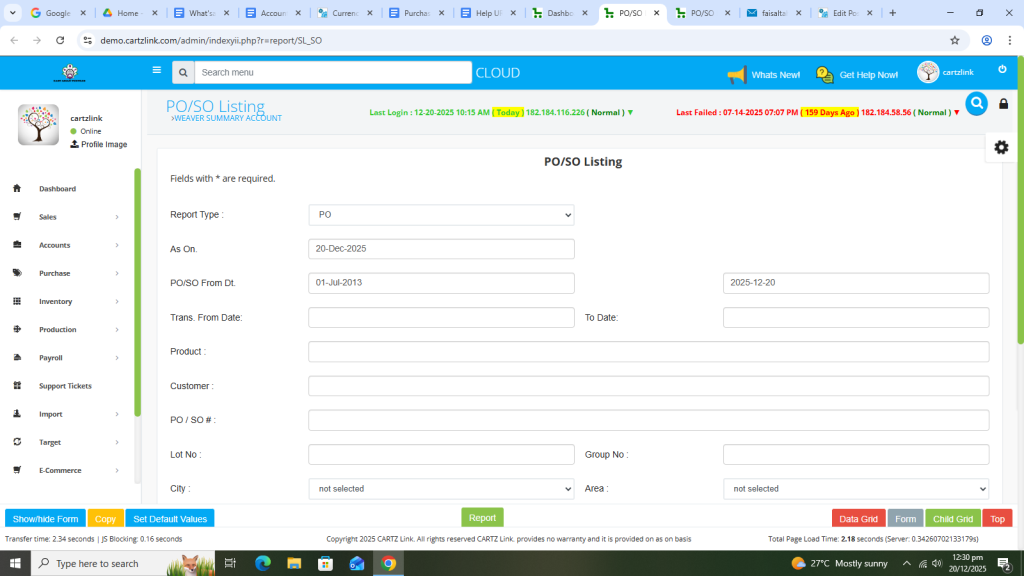
Now select the date range for the report as per the requirement.


Once the Date Range is selected, click on the Report button at the bottom.

Your desired report will open in a new window with the Save / Print option.

Now if you require Sales Order Listing then go to the previous page and select SO in Report Type.

Now select the date range as per the requirement.

Click on the Report button at the bottom.

Your desired report will open in a new window with the Save / Print option.

