Dynamic forms are used to generate complete forms / grids with CRUD support and validations without writing any code. They are controlled by database and can be modified for a client without affecting other locations.
Dynamic forms must be generated within 2 steps:
- Create a new doctype
- Create a view
Create Doctype
Go to doctype screen for your domain:
http://enterprisedemo.primeerp.top.local/admin/indexyii.php?r=doctype/
Now, define all fields in your doctype including id and created / modified columns:
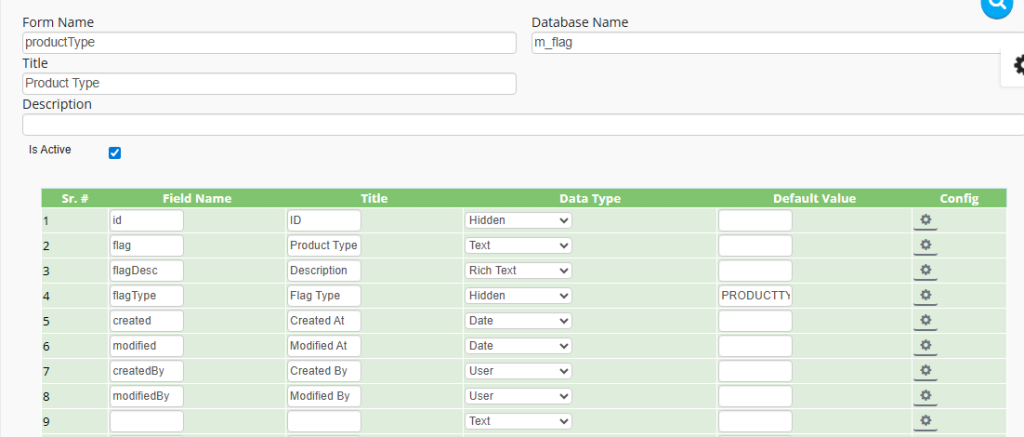
Finally, click save to generate your doctype.
Create View
A view defines the UI of a doctype including the form, grid and more. We are going to create a form view for our doctype with this query:
INSERT INTO doctype_views
VALUES ('productType.default', <ID in Doctype Table>, 'admin', '<your layout>', 1)
A very simple layout will look like this:
[
    {
        "name": "m_flag-form",
        "type": "Form",
        "children": [
            "id",
            "flag",
            "flagDesc",
            "flagType"
        ]
    },
    {
        "name": "m_flag-grid",
        "type": "Grid",
        "children": [
            {
                "name": "edit-delete",
                "type": "EditDelete"
            },
            "id",
            "flag",
            "created",
            "createdBy",
            "modified",
            "modifiedBy"
        ]
    }
]
Make sure to minify it before saving into the system. This is the final query that I’m going to use:
INSERT INTO doctype_views
VALUES ('productType.default', 4, 'admin', '[{"name":"m_flag-form","type":"Form","children":["id","flag","flagDesc","flagType"]},{"name":"m_flag-grid","type":"Grid","children":[{"name":"edit-delete","type":"EditDelete"},"id","flag","created","createdBy","modified","modifiedBy"]}]', 1)
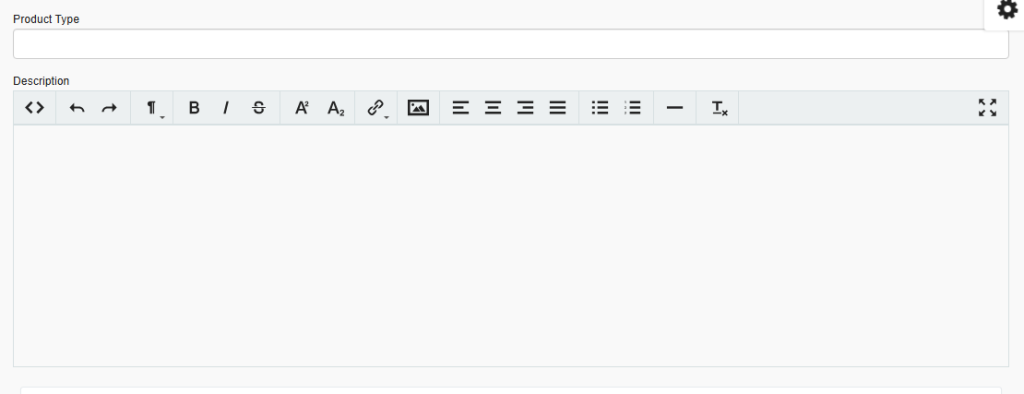
After executing it, you can access the new form on this URL:
http://enterprisedemo.primeerp.top.local/admin/indexyii.php?r=form&id=productType
Additional Documentation
Layouts: <Pending>
Field Types: <Pending>
Validation: <Pending>